Educational familiarization only. This is original TechOpsBase learning content created from privately supplied legacy training and MSG-3 source material. It does not reproduce manufacturer pages, proprietary diagrams, task steps, numerical maintenance limits, dispatch criteria or controlled maintenance data. Current approved aircraft data, effectivity and operator procedures govern all aircraft work.
Resource profile
- Aircraft: Airbus A350 family
- ATA chapter: 42 — Integrated Modular Avionics
- Resource: A350 ATA 42 CPIOM Hardware, Software and Partitioning
- Level: Intermediate-to-advanced
- Status: Draft pending technical review
Learning objectives
- Describe CPIOM hardware.
- Explain basic software and API.
- Understand time/memory partitioning.
- Recognize module versus application faults.
- Apply partition-level diagnosis.
1. Purpose and operational value
A CPIOM supplies shared processing and input/output resources while robust partitioning keeps hosted applications functionally independent.
2. Architecture and system flow
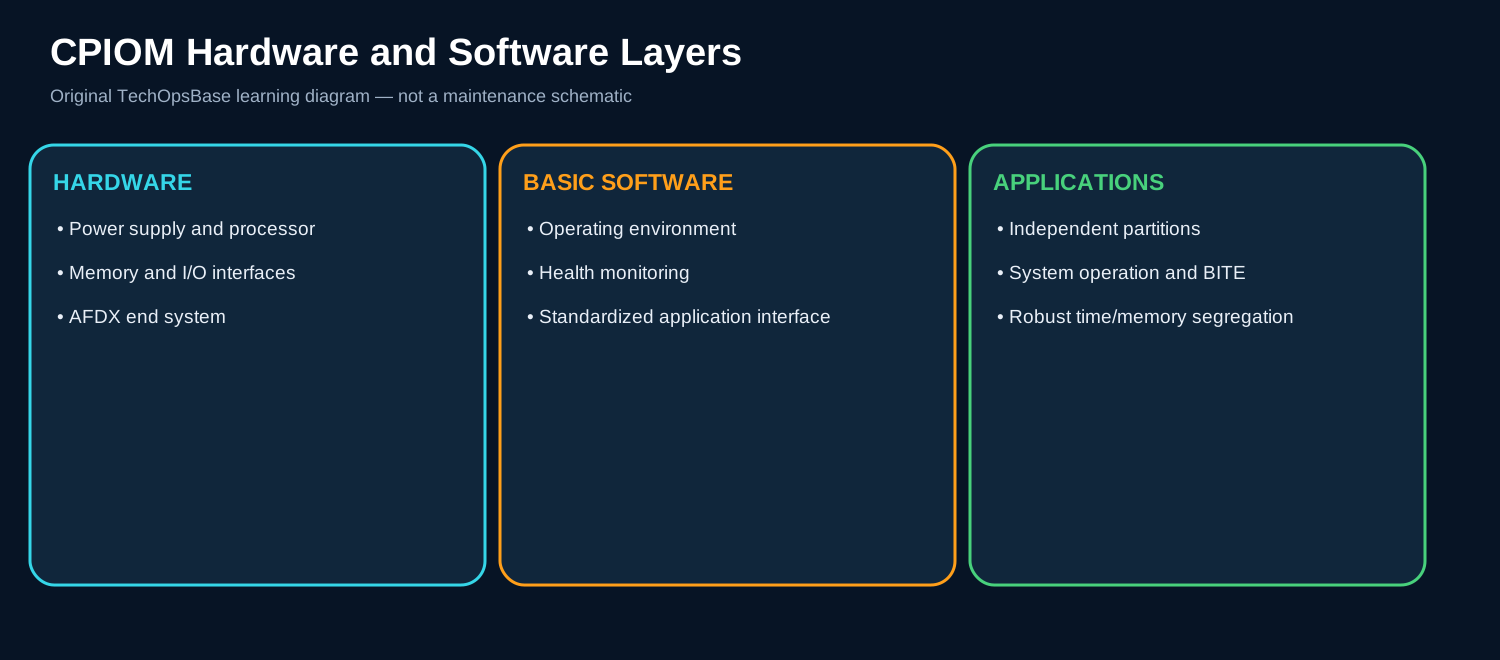
CPIOM hardware includes processing, memory, power, AFDX and aircraft-signal interfaces according to type.
Basic software controls hardware resources, scheduling, communication and health monitoring.
Independent applications run in segregated partitions so one application should not corrupt another, while a common hardware failure can affect all hosted partitions.
3. Major components and functions
Processor/memory
Executes basic software and hosted applications. The component must receive the correct input, perform its intended function and provide a valid output or status. A maintenance diagnosis must separate loss of power, loss of communication, incorrect configuration, blockage or leakage, contamination, mechanical degradation and an upstream or downstream interface failure. Useful evidence includes module health, watchdogs, memory faults and startup. Command, feedback and physical effect must agree before hardware is condemned.
I/O interfaces
Connect AFDX and non-AFDX aircraft signals. The component must receive the correct input, perform its intended function and provide a valid output or status. A maintenance diagnosis must separate loss of power, loss of communication, incorrect configuration, blockage or leakage, contamination, mechanical degradation and an upstream or downstream interface failure. Useful evidence includes port status, channel/group loss and external wiring. Command, feedback and physical effect must agree before hardware is condemned.
Basic software
Manages scheduling, hardware and health monitoring. The component must receive the correct input, perform its intended function and provide a valid output or status. A maintenance diagnosis must separate loss of power, loss of communication, incorrect configuration, blockage or leakage, contamination, mechanical degradation and an upstream or downstream interface failure. Useful evidence includes startup, common services and fault records. Command, feedback and physical effect must agree before hardware is condemned.
Application partitions
Run independent aircraft functions. The component must receive the correct input, perform its intended function and provide a valid output or status. A maintenance diagnosis must separate loss of power, loss of communication, incorrect configuration, blockage or leakage, contamination, mechanical degradation and an upstream or downstream interface failure. Useful evidence includes application status, restart and interface dependencies. Command, feedback and physical effect must agree before hardware is condemned.
Standardized API
Separates application software from module implementation. The component must receive the correct input, perform its intended function and provide a valid output or status. A maintenance diagnosis must separate loss of power, loss of communication, incorrect configuration, blockage or leakage, contamination, mechanical degradation and an upstream or downstream interface failure. Useful evidence includes compatibility, software load and configuration. Command, feedback and physical effect must agree before hardware is condemned.
4. Normal operating sequence
1. Boot
Module verifies hardware and loads basic software.
2. Partition start
Configured applications initialize independently.
3. Execute
Applications process inputs and publish outputs.
4. Monitor
Health monitoring detects module/partition/interface faults.
5. Recover/report
Allowed restart or fault reporting occurs.
5. Control, monitoring and protection
Loss of all applications on one CPIOM points to common hardware/basic software/power before independent application failures.
One application can fail while the CPIOM and other partitions remain healthy.
6. Failure modes and maintenance reasoning
- Total CPIOM loss: Power, hardware, boot or common software.
- One partition lost: Application or partition-specific dependency.
- All AFDX data lost: End system/interface or common path.
- All local I/O lost: I/O interface group or module hardware.
- Repeated restart: Watchdog, thermal, power or software issue.
7. Interfaces with other aircraft systems
- AFDX network.
- CRDC gateways.
- Hosted ATA applications.
- Electrical/cooling.
- CMS/FWS.
8. Practical maintenance scenarios
One hosted app fails, others healthy
Do not replace CPIOM before application/dependency diagnosis.
All hosted apps fail together
Use common CPIOM evidence.
Module replacement repeats fault
Check power, cooling, software and configuration.
9. Technician takeaways
- CPIOM and hosted application are different fault levels.
- Partitioning limits software propagation, not hardware common cause.
- Preserve hosted-application list.
- Verify correct software/configuration.
Maintenance boundary
This resource explains architecture, operation, indications and system-level troubleshooting. It intentionally excludes removal/installation instructions, wiring-pin checks, maintenance limits, software part numbers, servicing quantities, inspection intervals and release-to-service criteria.
Review prompts
- What is the required system function?
- Which component commands, processes or physically performs it?
- Which power, fluid, pneumatic or data path is required?
- What command proves the function was requested?
- What feedback or physical effect proves correct operation?
- Which adjacent ATA system can create the same symptom?
- What evidence should be preserved before reset, draining, servicing or software action?
- What hygiene, electrical, pressure, network or safety boundary applies?